
Geofences
Built for the Real World, Not Just Perfect Circles on a Map
Most timekeeping tools treat geofencing like an afterthought. A single circle around a job site. Maybe two, if you’re lucky. Worksana’s geofencing was built the way your business actually operates: multiple sites, irregular fields, remote crews, overlapping responsibilities, and employees who might work in different places depending on the day.
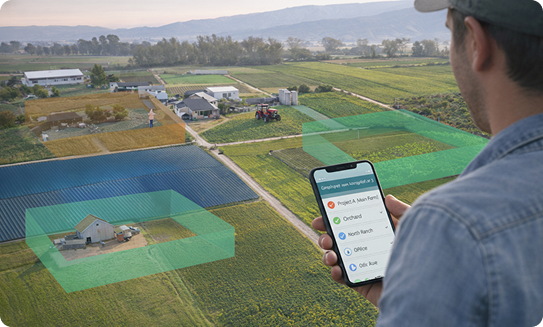
Multiple job sites
Assign and manage geofences across all your locations.
Irregular land shapes
Draw geofences that match real fields, lots, and properties
Remote and roaming crews
Let mobile teams clock in wherever approved work takes them
Different sites on different days
Give employees access to multiple sites so clock-ins stay accurate
Assign Employees
One geofence or dozens
Some employees work one location. Others float across multiple farms, fields, or job sites.
With Worksana, you can:
Assign an employee to a single location
Or grant access to multiple approved geofences
Adjust permissions as roles or schedules change
No messy workarounds. No duplicate profiles. Just clean control over who can clock in where.
Real World Use
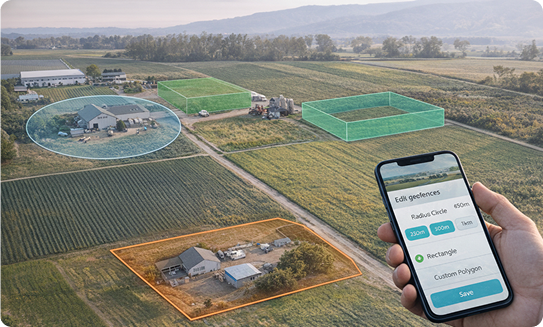
Use circles, boxes, or fully custom polygons
Real properties aren’t perfect shapes. Your geofences shouldn’t be either.
Create boundaries that match the actual footprint of your site:
Radius-based circles
Square or rectangular lots
Fully custom polygons for irregular areas
Some customers draw a geofence around an entire ranch—then carve out a small exclusion zone around an employee’s home. Employees must walk a short distance before clocking in. Practical. Precise. Fair.
REACH OUT TO US
See how Worksana works in the real world
Get a short walkthrough tailored to your operation. We’ll show you how teams clock in, how compliance is handled, and how payroll stays accurate, without adding extra work to your day.